
QuickBooks Group Reporting and Consolidation
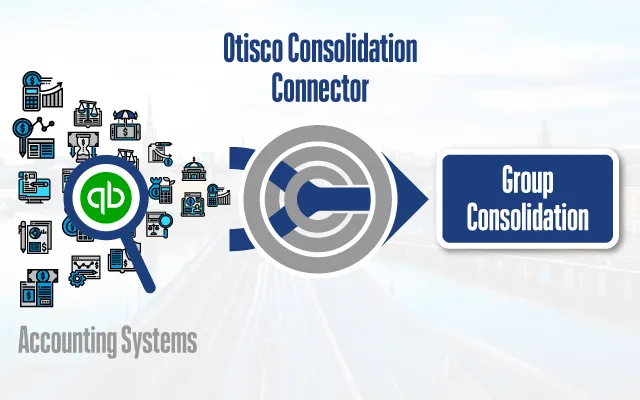
Connect QuickBooks with the group’s consolidation system, whichever it is, or with Excel, using Otisco. Deliver structured data for reliable, efficient consolidation across your entities.
From class tracking to chart mapping, Otisco simplifies the setup.
About Otisco
Structured Financial Data for Reliable Consolidation
Otisco is designed to link your QuickBooks accounting data with your consolidation system or Excel-based consolidation frameworks. It supports structured data preparation and delivery to ensure better alignment with your internal consolidation processes.
The connector allows for:
- Clearer data flows between systems
- Greater reporting consistency across entities
- Better control, audit trails, and error reduction through standardized data handling
- Flexibility to support multiple consolidation platforms
Streamline your group reporting process with structured QuickBooks data.
Features and Reporting Capabilities
Tools Built for Group Finance Teams
The QuickBooks integration offers a robust feature set designed to support accurate, recurring group reporting:

Account Mapping
Map QuickBooks accounts to a unified chart for group-level analysis.

Intercompany Reconciliation
Tag and track intercompany entries for cleaner consolidation.

Entity Onboarding
Quickly bring new companies into your reporting model without rework.
Proforma and Scenario Reporting
Prepare consolidated outputs with future or provisional data.

Class and Location Support
Use QuickBooks dimensions for analytical or segmented group reporting.
These features improve reconciliation, save time, and support strategic decision-making.
Reduce errors and close faster with a repeatable consolidation workflow.
Getting Started
How the Integration Works
Get Started:
Begin by contacting us at sales@otisco.se to book a 30-minute demo. We’ll walk through your current QuickBooks setup and group reporting needs.
Following the demo, we'll provide a proposal and pricing.
Excel-based consolidation is also supported if your team is not using a consolidation system.
QuickBooks data stays aligned across all entities and consolidation tools.
Already using Otisco? If the group already uses Otisco, adding QuickBooks companies is quick and simple.
Built for Scale & Flexibility
Whether you're managing five entities or fifty, Otisco scales with your business as it grows:

Works With Your Setup
Otisco connects to QuickBooks as it is. You don’t need to change your workflows or systems.

Multi-Entity Setup
Add and configure new QuickBooks entities quickly and consistently.

Governance & Control
Role-based permissions and full audit logs give finance teams confidence and control.
Otisco fits into your workflow without requiring custom development.
Transfer financial data from QuickBooks to your consolidation system without manual exports.
Frequently Asked Questions (FAQ): QuickBooks Group Reporting
Can I consolidate multiple QuickBooks companies at once?
Yes. The connector supports multi-entity setups across different QuickBooks instances, making it ideal for groups with many subsidiaries or regional companies.
Which consolidation systems does it work with?
Otisco is independent of the consolidation system. It delivers the figures, mapped, reconciled and validated, to the consolidation system the group already uses, or to Excel.
Can I include class and location tracking in the consolidation?
Yes. If your group uses classes, locations, or tags in QuickBooks, we can include that dimensional data in what is delivered to your consolidation system or Excel.
How are currency conversions handled?
Otisco transfers financial data in each company’s local currency. Currency translation is then handled within your consolidation system, using your defined exchange rates and reporting logic. We ensure the data structure supports your consolidation setup.
What happens if transactions are updated in QuickBooks after they have been transferred?
Otisco picks up the changes, so your consolidated reports stay accurate.
Interested in a Demo?
Let us show you how Otisco can support your group reporting with our QuickBooks integration.
In a 30-minute session, we’ll walk you through how the connector collects structured financial data from QuickBooks and delivers it directly to your consolidation system or Excel—no exports, no reformatting, no manual merging.
We’ll also cover the onboarding steps, review your group structure, and explain how the connector supports account mapping, classes and locations, and multi-entity setups.
Otisco provides hands-on support from day one to ensure the integration fits cleanly into your reporting workflow.
Email sales@otisco.se to book a demo tailored to your business needs.
Otisco
Integrate QuickBooks with your consolidation system
Otisco integrates QuickBooks with your consolidation system, whichever it is, or with Excel solutions. Save time and increase the quality of your reporting.
For a demo and/or pricing please email sales@otisco.se